

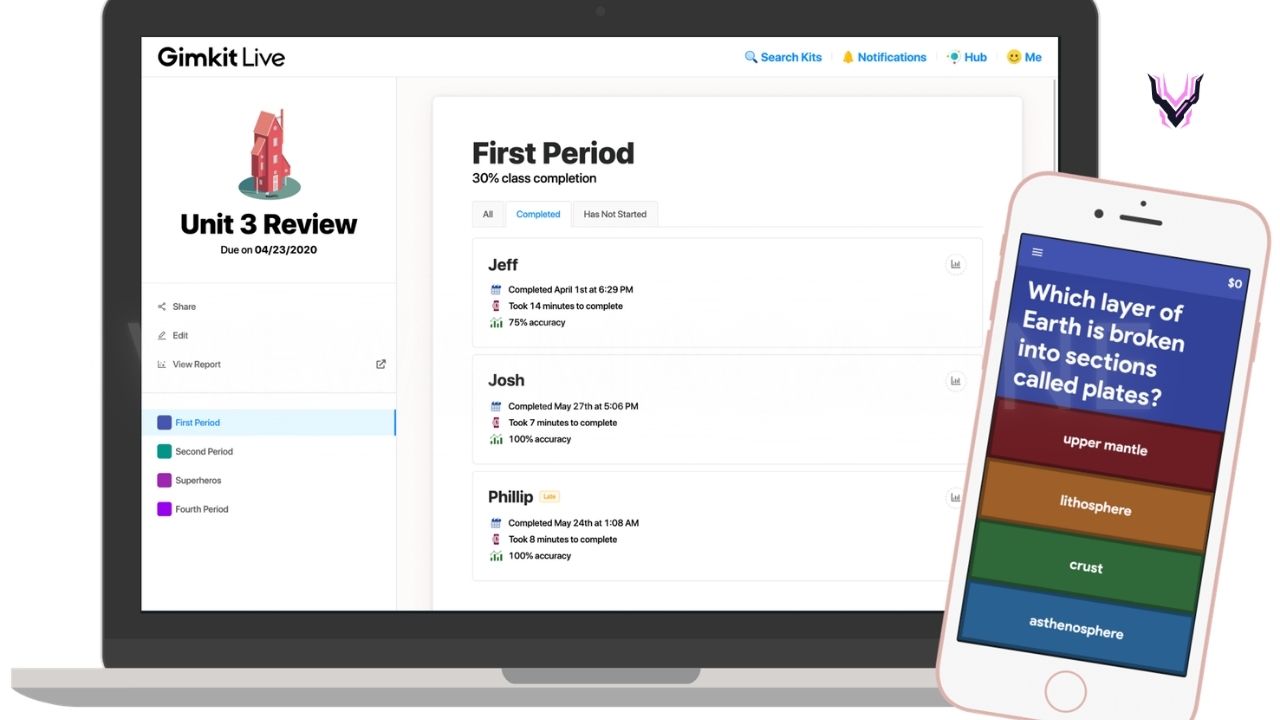
Game-based learning has transformed the way teachers engage students, making lessons more interactive, competitive, and enjoyable. Among the many educational platforms available today, Gimkit has become a favorite for classrooms because it combines quizzes with exciting game mechanics. One of the most important roles on the platform is the Gimkit host. The host is responsible for creating, launching, and managing live games, ensuring students can join and participate in engaging learning activities.
Whether you’re a teacher, tutor, trainer, or educator exploring Gimkit for the first time, understanding how hosting works is essential. A Gimkit host controls game settings, selects game modes, monitors student progress, and can adjust options to suit different learning environments.
What Is a Gimkit Host?
A Gimkit host is the person who creates and manages a live Gimkit game. In most cases, this is a teacher, tutor, or instructor who selects a quiz (known as a “Kit”), chooses a game mode, customizes game settings, and starts the session for participants. Once the game begins, students join by entering a unique game code or using a shared join link. The host oversees the session, monitors player progress, and can end or restart the game whenever needed.
Hosting a game goes beyond simply launching a quiz. The host controls important settings such as time limits, game objectives, question order, and participation rules. Depending on the selected game mode, the host may also enable team play, assign power-ups, or adjust earning mechanics that make gameplay more engaging. These customization options allow educators to tailor each session to different grade levels, lesson objectives, and classroom environments.
How Does a Gimkit Host Work?
The hosting process begins after logging into a Gimkit account and selecting an existing Kit or creating a new one. After choosing the quiz, the host selects one of Gimkit’s available game modes and configures the desired settings. These options may include game duration, target score, music preferences, accessibility settings, and other gameplay adjustments. Once everything is ready, Gimkit generates a unique game code that students use to join the session from their own devices.
During gameplay, the host has access to a live dashboard displaying player scores, rankings, participation levels, and overall progress. This real-time information helps teachers identify students who may need additional support or recognize those performing exceptionally well. At the end of the game, detailed reports provide valuable insights into student performance, highlighting correct and incorrect answers that can guide future instruction and classroom discussions.
Requirements to Become a Gimkit Host
Becoming a Gimkit host is simple and requires only a few basic resources. First, you’ll need a Gimkit account, which can be created through the official website. While a free account allows users to host games with certain limitations, a Gimkit Pro subscription unlocks additional game modes, assignments, customization options, and advanced classroom features. Choosing the right plan depends on your teaching needs and how frequently you plan to use the platform.
You’ll also need a reliable internet connection and a compatible device such as a desktop computer, laptop, tablet, or smartphone. Students can participate using their own internet-connected devices, making Gimkit suitable for both in-person and remote learning environments. Before hosting your first session, it’s a good idea to test your internet connection and familiarize yourself with the platform’s interface to ensure a smooth experience for everyone involved.
How to Host Your First Gimkit Game
Hosting your first Gimkit game is a straightforward process. After signing in, select an existing Kit from your library or create a new quiz by adding questions manually or importing them from supported sources. Next, choose the game mode that best matches your lesson objectives. Gimkit offers a variety of interactive modes that keep students engaged while reinforcing classroom concepts through friendly competition.
Once you’ve selected the game mode, review and customize the available settings before launching the session. When you click Host, Gimkit generates a unique join code and link that students use to enter the game. As players join, you can confirm attendance, monitor participation, and begin the activity when everyone is ready. Throughout the session, you’ll be able to track progress in real time and review detailed performance reports after the game ends.
Popular Gimkit Game Modes
One of the biggest reasons educators enjoy using Gimkit is its variety of engaging game modes. Instead of repeating the same quiz format, teachers can choose experiences that encourage teamwork, strategy, and friendly competition. Classic Mode is one of the simplest options, allowing students to answer questions individually while earning virtual currency to purchase upgrades. This mode works well for quick reviews, homework discussions, and test preparation because students stay motivated to answer correctly.
Gimkit also offers creative game modes such as Team Mode, Trust No One, The Floor Is Lava, Snowbrawl, and Draw That. Each mode introduces different objectives that keep students engaged while reinforcing lesson content. Teachers can select the mode that best matches their classroom goals, whether they want collaborative learning, competitive gameplay, or creative problem-solving. Regularly changing game modes helps maintain student interest and prevents classroom activities from becoming repetitive.
Benefits of Using Gimkit in the Classroom
Gimkit turns traditional quizzes into interactive learning experiences that encourage active participation. Instead of simply answering questions on paper, students earn rewards, compete with classmates, and receive immediate feedback on their performance. This instant feedback helps reinforce learning while allowing teachers to identify topics that may require additional review. The engaging format also increases student motivation, making classroom assessments feel more like games than formal tests.
Another major advantage is the detailed reporting available after each session. Gimkit provides performance data that shows which questions students answered correctly or incorrectly, making it easier for teachers to measure understanding. These reports help educators identify learning gaps, adjust lesson plans, and provide targeted support for students who need additional assistance. Whether used for daily review, exam preparation, or formative assessment, Gimkit supports a more interactive and data-driven teaching approach.
Common Hosting Tips and Best Practices
Successful Gimkit hosts prepare their games before students arrive. Reviewing quiz questions, selecting an appropriate game mode, and testing settings in advance can prevent technical issues during class. Teachers should also explain the game rules before starting so every student understands how to participate. Choosing a game mode that matches the lesson objective helps maximize learning while keeping students focused throughout the activity.
It is also helpful to monitor student progress during gameplay rather than waiting until the game ends. Watching the live leaderboard and participation dashboard allows hosts to identify students who may be struggling or becoming disengaged. Encouraging teamwork, celebrating improvement, and discussing challenging questions after the game can further strengthen learning outcomes. Regularly updating question sets and rotating game modes also keeps classroom activities fresh and exciting.
Gimkit Free vs. Gimkit Pro
Gimkit offers both Free and Pro plans, allowing educators to choose the option that best fits their teaching needs. The free version provides access to basic hosting features, making it an excellent starting point for teachers who want to explore the platform without a financial commitment. Users can create quizzes, host live games, and experience several core features, although some game modes and advanced tools remain unavailable.
The Gimkit Pro subscription expands the platform with additional game modes, assignments, enhanced customization, and more detailed classroom management tools. Teachers who use Gimkit regularly often prefer Pro because it offers greater flexibility and more engaging classroom experiences. Schools that integrate game-based learning into their curriculum may find the subscription worthwhile due to its expanded educational features.
Gimkit Free vs. Gimkit Pro Comparison
| Feature | Gimkit Free | Gimkit Pro |
|---|---|---|
| Live Game Hosting | ✅ Yes | ✅ Yes |
| Create Custom Kits | ✅ Yes | ✅ Yes |
| Basic Game Modes | ✅ Available | ✅ Available |
| Premium Game Modes | ❌ Limited | ✅ Full Access |
| Assignments | Limited | ✅ Included |
| Advanced Settings | Basic | ✅ Advanced |
| Detailed Reports | Basic | ✅ More Comprehensive |
| Best For | New Users and Occasional Teachers | Regular Educators and Schools |
Common Problems and Troubleshooting
Although Gimkit is designed to be easy to use, occasional technical issues may occur during live sessions. One common problem is students being unable to join the game. This usually happens because the game code was entered incorrectly, the session has already ended, or the student’s internet connection is unstable. Verifying the join code and refreshing the browser often resolves these issues quickly.
Another challenge involves slow performance or disconnected players during large classroom sessions. Ensuring a stable internet connection, closing unnecessary browser tabs, and using updated web browsers can improve performance. If audio, visuals, or game settings do not behave as expected, restarting the session or clearing the browser cache may solve the problem. Familiarizing yourself with Gimkit’s settings before class also reduces the likelihood of interruptions during live gameplay.
Conclusion
A Gimkit host plays a key role in creating engaging and interactive learning experiences. By selecting quizzes, choosing game modes, customizing settings, and monitoring student progress, hosts can turn ordinary classroom reviews into exciting educational activities. Whether you’re teaching in person, online, or through a hybrid classroom, Gimkit offers flexible tools that encourage participation, reinforce learning, and provide valuable insights into student performance.
For beginners, hosting a Gimkit game is simple and requires only a Gimkit account, a compatible device, and an internet connection. Starting with the free version allows educators to explore the platform, while Gimkit Pro provides additional game modes and advanced classroom management features. With proper preparation and thoughtful use of its interactive tools, Gimkit can become an effective resource for improving student engagement and making learning more enjoyable.
Stay More Update VIEWS MAGAZINE